Custom Seas hands you the keys to your very own Sea of Thieves session, a private sandbox where you set the rules, summon the treasure you want, and shape the experience however you like. But before you can craft your perfect Sea of Thieves experience, you’ll need to create and host a Custom Seas session!
How to Create and Host a Custom Seas Session
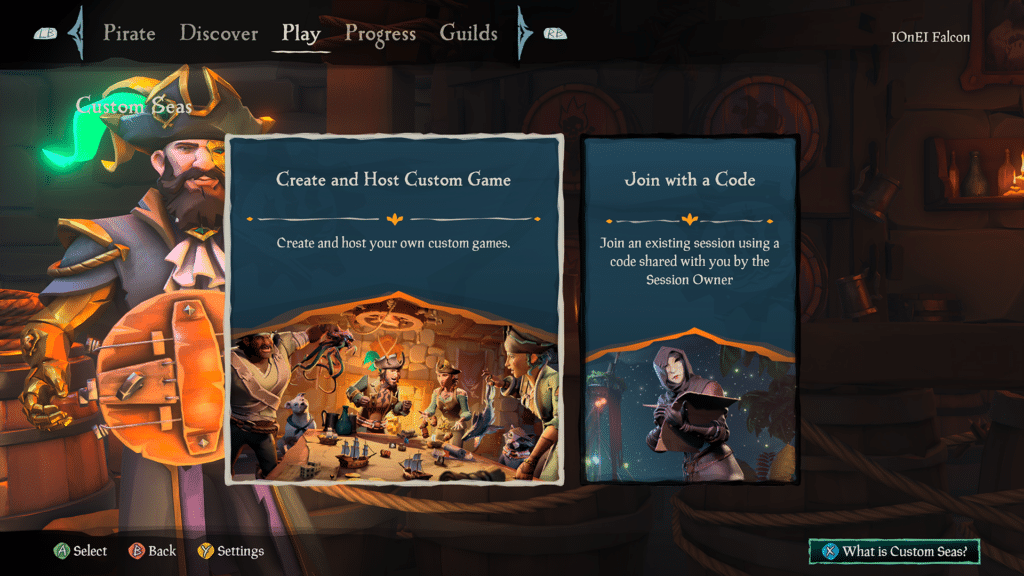
To start a Custom Seas session, select Custom Seas when choosing your experience from the Play menu. From here, you’ll see two options: Create and Host Custom Game to build your own session or Join with a Code to drop into someone else’s.
Select Create and Host Custom Game, and then you’ll be prompted to Choose a Preset. You can choose one of the five official presets or one of your own presets. The five official presets, each with their own playstyle, are:
- Adventure
- Competitive Pirates
- Competitive Sandbox
- Creative
- Social
Whichever you choose is only a foundation of your session, as presets can be modified once selected.
Picking a preset takes you to Session Setup, where you can customize your session before sailing. Whoever creates the session becomes the Session Owner and can Edit Role Permissions, Change Presets, Edit Session Switches, Choose Location, and Edit Ships and Crews.
You can also bring other pirates into your session during Session Setup, either directly or by sharing your Join Code. You can have up to 6 ships and 24 players in a single Custom Seas session.
Once you have configured your session to your liking, select Set Sail. A short countdown will begin, and when it finishes, everyone will drop into your Custom Seas session together.