A long drive through Leonida is not complete without the right song on the radio. Whether you are rolling through the Keys at sunset or tearing down the highway with the cops on your tail, the soundtrack makes the trip.
How to change the radio station
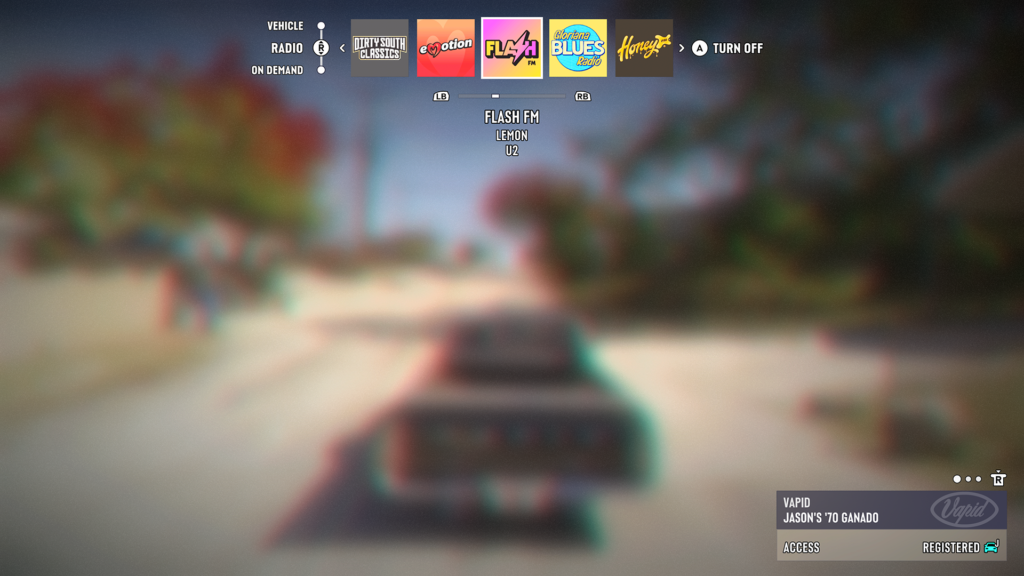
To change the radio station in GTA VI, hold Left on the D-pad while in a vehicle. This opens the vehicle menu at the top of your screen, where you can pick a station.
Here are the steps in order:
- Get in a vehicle
- Hold Left on the D-pad to open the vehicle menu
- Use the Right Stick to move to the Radio row
- Scroll left or right to highlight a station
The name of the highlighted station appears beneath the row, along with whether the radio is currently on or off.
Be sure to hold the D-pad and not just tap it. A quick tap of Left on the D-pad turns on your blinker instead.
All radio stations in GTA VI
There are 22 radio stations on the dial in GTA VI. In the order they appear in the vehicle menu, the stations are:
- Afrobank FM
- Back Country Radio
- The Chamber 106.6
- Circoloco Records Radio
- Cocoteo FM
- Dirty South Classics
- Emotion 98.3
- Flash FM
- Gloriana Blues Radio
- Honey FM
- Kaleidoscope FM
- Leonida Jazz Radio
- Radio La Ola
- Radio On-U
- Stockyard FM
- Symphony FM
- The Wipe
- VCRR
- Vice City FM
- V-Rock
- WKTT
- Worldwide FM
The row loops around, so if you keep scrolling in one direction, you’ll end up back where you started.